How to Use UTM Parameters with Shopify
What are UTM parameters?
UTM parameters are short pieces of text appended to the end of a URL that help analytics tools (like Google Analytics) identify key information about traffic entering a website. UTM parameters offer insight into where traffic is coming from, which marketing medium delivered it, and which specific campaign generated each click.
UTM stands for Urchin Tracking Module, which is named for the Urchin Software Corporation. Urchin Software was acquired by Google in 2005 to develop Google Analytics. Today, UTM parameters are industry standard tracking assets that can be used with a variety of analytics platforms, including Shopify and Triple Whale.

Examples of UTMs and how they’re used
UTM parameters are a form of query string, which appear at the end of URLs after a question mark (?), but while query strings can have a variety of purposes, including defining search parameters, filtering, sorting, and pagination, UTMs are specifically used to track various website traffic sources in analytics software.
Chances are you’ve seen a UTM before, even if you didn’t recognize its purpose.
A clean URL looks like this: https://www.blueswitch.com/
The same URL with UTM parameters looks like this:
https://www.blueswitch.com/?utm_source=google&utm_medium=organic&utm_campaign=blog_post&utm_content=utm_and_shopify
Essentially, the UTM parameter is all of the content that comes after the question mark (?) in the example URL. If a user clicked the URL above, the session would be logged in analytics with the following information:
Source = Google
Medium = Organic
Campaign = Blog Post
Content = UTM and Shopify
Adding UTM parameters to Shopify
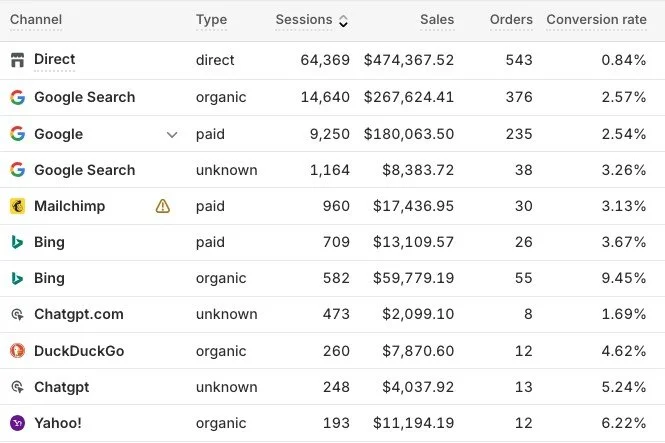
Here at BlueSwitch, we occasionally have clients that ask us to “add” UTM links to Shopify so they can identify which external ad campaigns are driving traffic and revenue. Unfortunately, Shopify doesn’t support the upload of custom UTM parameters the way some other web platforms do, so we can’t technically “add” them to Shopify, but Shopify is able to recognize standard UTM parameters like utm_source, utm_medium, and utm_campaign.
The best way to get Shopify analytics to recognize your UTM parameters is to use the standard parameters that are commonly associated with Google Analytics and other analytics platforms. These parameters will assign relevant traffic to the appropriate source, medium, and campaign, and can even carry additional data like the specific piece of content and search term the traffic originated from. Using the standard UTM parameters will ensure that sessions will be logged properly in both Shopify analytics, and Google Analytics GA4.
Standard UTM parameters
utm_source = the website where your traffic originated (common variables below)
Facebook
Instagram
LinkedIn
Google
Twitter
TikTok
Newsletter
Email Signature
utm_medium = the type of site where your traffic originated (common variables below)
cpc (Cost-Per-Click): Used for paid search ads
email: Used for email newsletters or campaigns
social: Used for organic social media posts
paid-social: Specifically for paid social media ads
display: For banner or display ads
organic: Used for free search traffic and SEO
affiliate: Used for partner or influencer links
referral: Traffic from another website or blog, often used with influencer content or directory listings
sms: For text message marketing campaigns
utm_campaign = the specific campaign identifier to differentiate between various ad groups (i.e. holiday_video_2026, or alphanumeric string)
utm_term (optional) = the keyword or search term that originated the session (most often associated with CPC campaigns)
utm_content (optional) = defines the specific content used in ad groups (i.e. lifestyle_video_12345)

When and Where to Use UTM Parameters
If you’re running paid ad campaigns on platforms like Meta, Google Ads, or TikTok, most of the inbound clicks from these campaigns have already been tagged with UTM parameters. Popular ad platforms add their own UTM parameters automatically, but there are many other situations where you may want to add a custom UTM parameter to an external digital property.
Say your business has a profile on a popular directory listing site like Yelp or BBB, you can use a UTM in the field for your website URL, so that any session that originates by clicking on that profile is counted as ‘referral’ traffic. If your website URL is included in your email signature, you can link with a UTM parameter so that sessions that originate from your email signature will be logged to the appropriate channel. You can also use UTMs on landing pages, affiliate websites, video descriptions and overlays, Reddit posts and comments, or any customizable link that’s driving traffic to your website.
UTM Template
Below you’ll find a template that you can use to craft your own custom UTM parameters and track inbound traffic to your Shopify storefront.
Instructions: Replace the items in red with your ad source, medium, and campaign ID information, using the tips below to ensure the UTMs can be read by Shopify analytics and other platforms.
https://yoursite.com/?utm_source=google&utm_medium=organic&utm_campaign=utm_blog_post
Pro Tips for crafting UTM parameters
✅ Always use a hyphen - or underscore _ character between words
✅ Place an ampersand after each variable to add additional UTM parameters
✅ Always use lowercase letters in UTM parameters
✅ The utm_source and utm_campaign parameters can contain any content you choose, as long as it helps you identify the specific source and campaign driving your traffic
✅ There are a limited number of options for the utm_medium parameter, choose from the above list of defined medium parameters.
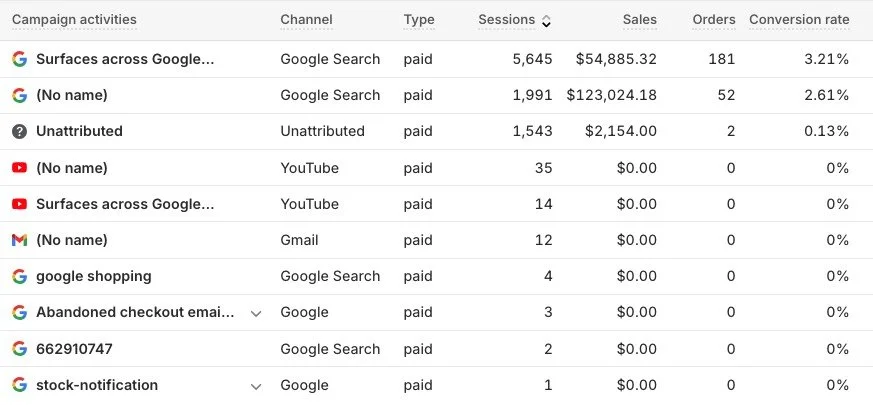
Essential tracking data for external marketing properties
UTM parameters are essential tools for accurately tracking the performance of your marketing efforts across various platforms and mediums, providing the critical data needed to optimize your Shopify storefront's success. By consistently using these standard parameters, you ensure reliable data collection in both Shopify and Google Analytics.
If you need expert assistance setting up your analytics, refining your UTM strategy, or driving more traffic and revenue to your Shopify store, don't hesitate to reach out to the digital marketing and analytics experts at BlueSwitch. Visit our contact page or email info@blueswitch.com